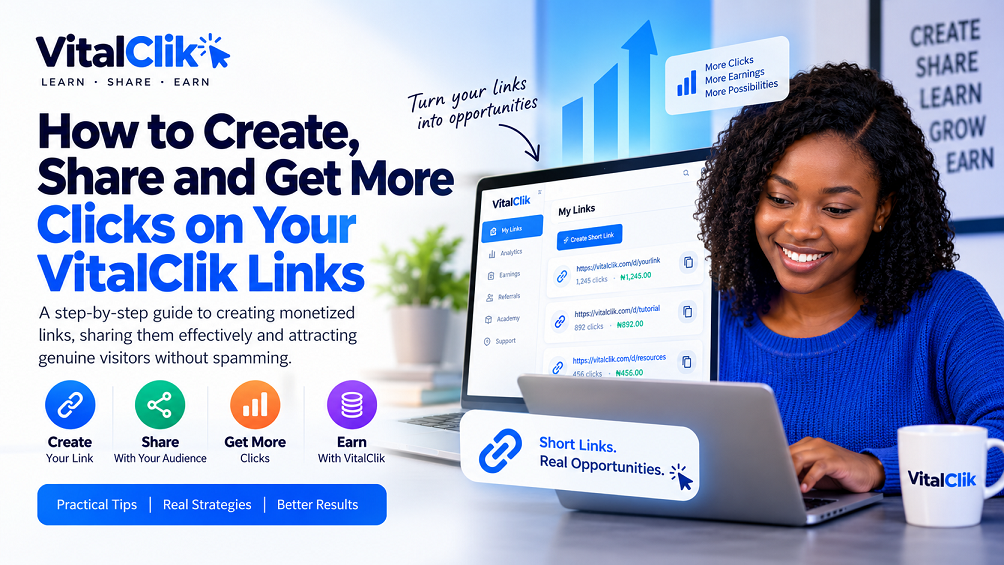
Creating a shortened link is easy.
Getting real people to actually click it is the part that requires some strategy.
Whether you’re sharing a normal website link, an affiliate link or a VitalClik monetized link, one principle remains the same:
Simply dropping your link everywhere and writing “Click my link” is unlikely to produce good long-term results. It can also make your posts look like spam.
A better approach is to create something useful, interesting, entertaining or relevant and allow your link to help the person take the next step.
In this guide, you’ll learn how to get more people to click your links, how to create your VitalClik monetized links, where you can share them, and practical ways to attract genuine visitors without relying on spam, bots or artificial traffic.
1. Understand Why Someone Should Click Your Link
Before sharing a link, ask yourself:
There should be something useful, interesting or relevant on the other side of the link.
It could be:
- A helpful article
- A video
- A tutorial
- A useful online tool
- A downloadable resource
- A product or service
- Additional information
- A guide
- An interesting story
- A legitimate offer
Your link should have a purpose.
Instead of simply posting:
❌ Don’t
Click here 👇
[Your Link]
A better approach is to give people a reason to click:
✓ Better
Want to create professional-looking videos directly from your smartphone?
Here’s a beginner-friendly resource that can help you get started.
[Your Link]
The second example gives the reader context and a genuine reason to continue.
2. How to Create a Monetized Link on VitalClik
Before you can start promoting your link, you first need to create your shortened monetized link.
Log in to your VitalClik account and open the My Links page.
You will see the Create Short Link section.
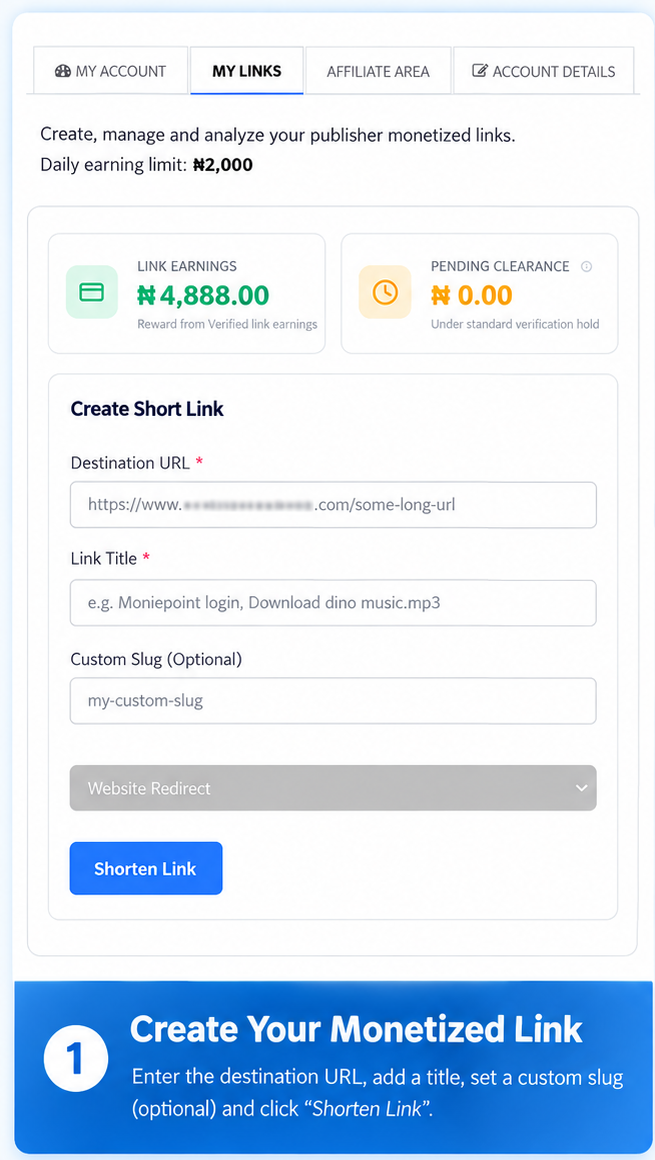
Step 1: Enter Your Destination URL
The Destination URL is the original webpage you want people to visit after using your shortened link.
For example, this could be a link to:
- A useful article
- A tutorial
- A video
- A software or online tool
- A downloadable resource you are permitted to share
- A product or service
- A useful website
- Another legitimate online resource
Copy the original URL and paste it into the Destination URL field.
Step 2: Give Your Link a Title
Next, enter a Link Title.
Use a title that helps you identify what the link is about.
Untitled Link
✓ Use descriptive titles such as:
- CapCut Tutorial for Beginners
- Free Canva Design Resources
- How to Start Affiliate Marketing
- AI Video Creation Guide
- WordPress Tutorial for Beginners
This becomes particularly helpful when you have created many different links because you can quickly identify what each link is for.
Step 3: Choose a Custom Slug (Optional)
VitalClik also provides a Custom Slug option.
A slug is the final part of your shortened URL.
In this example, capcut-guide is the custom slug.
Using a meaningful slug can make your link easier to recognize.
This field is optional. If you don’t want to create your own slug, you can allow the system to generate one for you.
Step 4: Select the Appropriate Link Type
Where the available option is shown, select the appropriate redirect or link type for the destination you are creating.
For a normal website or webpage, use the applicable Website Redirect option.
Other available options may depend on the link features currently provided by VitalClik.
Step 5: Click “Shorten Link”
Once you’ve entered the required information, click the Shorten Link button.
VitalClik will create your shortened monetized link.
Your new link will then appear under My Shortened Links.
After creating your link, scroll to the My Shortened Links section.
This is where you can see and manage the links you’ve created.
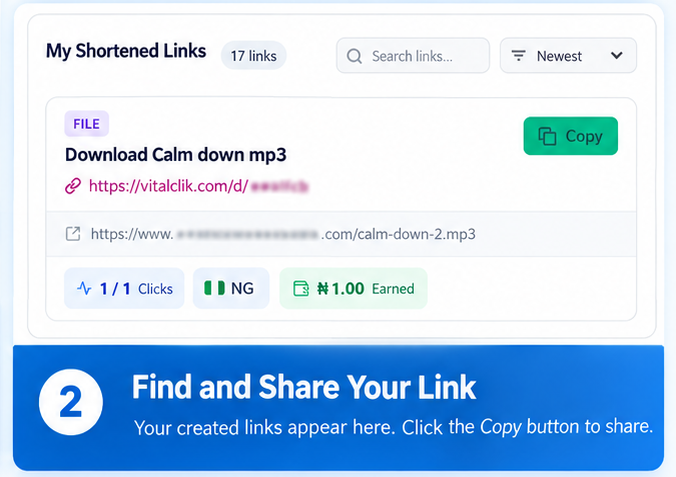
Click the Copy button beside the link you want to share.
You can then use that shortened link when sharing relevant content with your audience.
Depending on the sharing options currently available on your VitalClik dashboard, you may also see shortcuts for supported social platforms.
But don’t rush to paste your link everywhere.
4. Create Useful Content Before Promoting Your Link
One of the most effective ways to get more people to click your links is through useful content.
Your content attracts attention first.
Your link comes second.
You can create:
- Short videos
- Tutorials
- Blog posts
- Helpful social media posts
- Useful WhatsApp posts
- Infographics
- Checklists
- Reviews
- Comparisons
- Educational content
- Entertaining content
For example, suppose you create a video explaining five useful AI tools for content creators.
Instead of trying to explain everything inside the video, you could provide additional information or relevant resources through your link.
The viewer now has a genuine reason to click because your original content has already created interest.
Social media can be a useful source of genuine traffic when used properly.
Instead of repeatedly posting links, create content around the subject first.
For example, if your destination contains information about starting a YouTube channel, instead of simply dropping your link, you could write:
✓ Example Social Media Post
Thinking about starting a YouTube channel?
You don’t necessarily need expensive cameras and equipment to begin. Your smartphone may already be enough for your first videos.
I’ve added some useful information for beginners here:
[Your Link]
This gives the link context instead of simply asking people to click it.
You can use platforms such as Facebook, Instagram, TikTok, X, Threads and other platforms where your intended audience spends time.
Always follow the rules of the platform or community where you’re sharing your content.
6. Use Short Videos to Generate Traffic
Short videos can be particularly useful because they allow you to capture someone’s attention before asking them to visit a link.
You could create videos around topics such as:
- 3 websites every content creator should know
- How to create automatic captions in CapCut
- 3 mistakes new affiliate marketers make
- 5 useful tools for small business owners
- How to create an AI video from your phone
At the end of the video, give viewers a clear next step where appropriate.
“I’ve added the full guide in the description.”
Or:
“You can find the resources through the link in the description.”
The important part is that the video itself should provide value.
Don’t make every video nothing more than an advertisement for your link.
7. Use YouTube to Attract Long-Term Traffic
YouTube can potentially continue bringing visitors to useful content long after a video has been published.
Suppose you create a tutorial titled:
You could provide relevant supporting resources in the video’s description.
Someone may discover your tutorial, watch it and then follow the relevant link because they want additional information.
Over time, a collection of useful videos can create multiple sources of traffic.
8. Use WhatsApp Carefully
WhatsApp can also help you distribute useful content, particularly if you already have contacts, customers, followers or communities interested in a particular subject.
But there is an important difference between sharing and spamming.
Don’t repeatedly send unexplained links to people.
Instead, provide context.
✓ Example WhatsApp Post
If you’re learning mobile video editing, here’s a useful resource explaining some of the tools beginners should understand.
You can check it here:
[Your Link]
You can also use WhatsApp Status to publish useful tips, short videos and updates.
When someone is interested, they can voluntarily follow your link.
When sharing in groups or communities, always respect the group’s rules.
9. Start a Blog or Resource Website
A blog or resource website can become a long-term source of traffic.
Instead of constantly looking for individual people to send links to, you can create useful pages that people may discover through search engines, social media or recommendations.
For example, you could write an article titled:
Inside the article, you can naturally link to relevant resources where appropriate.
If the article receives visitors, some of those visitors may follow the relevant links contained within it.
Content Creators Already Have an Advantage
If you already share tutorials, guides, PDFs, downloads, software recommendations or other useful resources, monetized links can be incorporated where they genuinely make sense.
The monetized link should not replace the value you’re providing.
10. Answer Questions People Are Already Asking
You don’t always need to invent content ideas.
Look at the questions people repeatedly ask within the subject you understand.
For example:
- How do I edit videos on my phone?
- How can I create a website without coding?
- How do I create a YouTube thumbnail?
- What tools can I use to create AI videos?
- How do I start affiliate marketing?
Create genuinely helpful content that answers those questions.
Where an additional resource is relevant, your link can provide the next step.
This is much more natural than randomly distributing links.
11. Build an Audience Instead of Looking for One-Time Clicks
This is one of the most important strategies in this guide.
Imagine two people.
The first person has no audience and sends a link individually to strangers every day.
The second person has spent time building a social media page with people who are genuinely interested in a particular subject.
When the second person publishes something useful, interested followers already exist.
Your audience doesn’t have to be huge.
Start small.
You could build content around:
- Technology
- Entertainment
- Education
- Business
- Content creation
- Sports
- Career information
- Tutorials
- Smartphones
- Software
- Local information
- Another subject you understand well
Focus on becoming useful to a particular type of audience.
12. Don’t Mislead People Just to Get a Click
Trust matters.
Avoid misleading people into clicking something completely different from what you promised.
For example, if you tell someone:
The destination should genuinely relate to the Canva tutorial or resource you described.
Misleading headlines might generate an occasional click, but they can damage your audience’s trust.
Once people stop trusting your links, getting future clicks becomes much harder.
13. Monitor Your Clicks and Earnings
After you begin sharing your links, return to My Links to monitor their performance.
VitalClik provides link information that can help you understand which links are performing better.
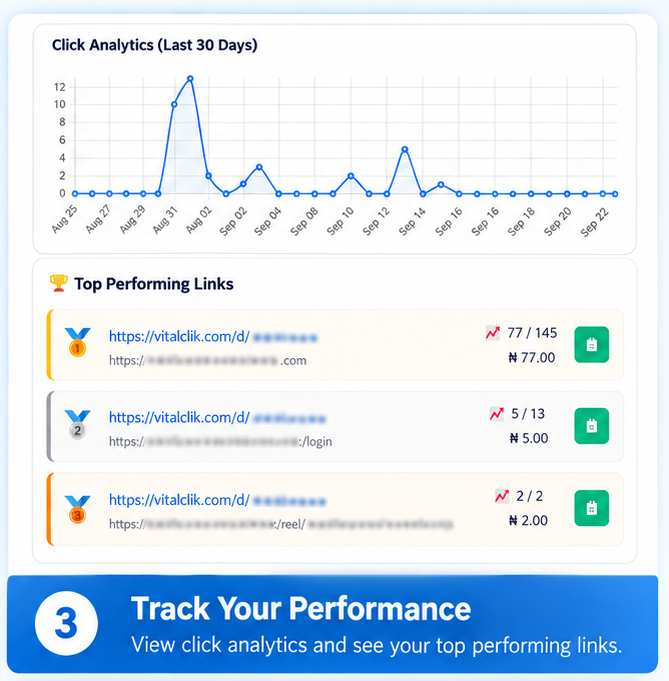
Depending on the information currently available in your dashboard, you may be able to review:
- Link activity
- Clicks
- Valid or credited clicks
- Earnings
- Better-performing links
- Recent performance
Suppose one link receives substantially more genuine traffic than your other links.
Ask yourself:
- What was different about the content?
- Where did I share it?
- Was it connected to a video?
- Did I use a better headline?
- Was the subject more useful or interesting?
- Was my audience more interested in that topic?
The answers can help you decide what type of content to create next.
14. Understand the Difference Between Clicks and Valid Earnings
Raw clicks alone don’t tell the entire story.
A link might receive visits, but that does not automatically mean every visit will qualify for earnings.
VitalClik validates traffic according to its applicable Link Earnings rules before qualifying activity is credited.
Instead of focusing only on:
Focus on:
15. Test Different Types of Content
You won’t necessarily know what works best for your audience immediately.
Experiment with different approaches.
You might discover that your audience responds better to short videos than text posts.
Or tutorials might perform better than entertainment content.
Facebook might send you more visitors than another platform, or YouTube might produce more consistent long-term traffic.
Try different approaches and use your results to decide where to spend more of your effort.
16. Avoid Fake or Artificial Traffic
There is a major difference between promoting your links and manipulating traffic.
Do not try to increase your VitalClik earnings using:
- Bots
- Automated clicking software
- Self-clicking for the purpose of generating earnings
- Repeated artificial clicks
- Click exchanges
- Fake visitors
- Misleading traffic methods
- Other attempts to manipulate clicks or earnings
The goal is to attract real people with genuine interest.
17. A Simple Link Promotion Strategy You Can Start Today
You don’t need to implement everything in this article at once.
Start with this simple process:
- Choose a subject people are genuinely interested in.
- Create something useful around that subject, such as a video, tutorial, post, guide or other resource.
- Choose a relevant destination that provides additional value to the person.
- Create your VitalClik monetized link using that destination URL.
- Share your content on platforms where your intended audience is active.
- Check your link analytics after you’ve generated some genuine traffic.
- Identify what worked and create more useful content around similar subjects.
Then repeat the process.
Over time, you’re not merely learning how to share links.
You’re developing skills in content creation, audience building and digital marketing.
18. How the VitalClik Digital Skills Academy Can Help
Getting more people to click your links is closely connected to developing useful digital skills.
For example:
- Content creation can help you produce better posts and videos.
- Social media marketing can help you understand how to reach and communicate with an audience.
- CapCut video editing can help you create better short videos.
- Canva can help you create attractive graphics.
- Affiliate marketing can help you better understand online promotion.
- ChatGPT and AI video creation tools can help improve your content-production workflow.
These are some of the practical digital skills members can explore through the VitalClik Digital Skills Academy.
Want to Develop Your Digital Skills?
VitalClik brings practical digital skills training, Link Earnings
and a direct affiliate referral program together in one platform.
VitalClik membership currently requires a one-time payment of ₦3,000.
Final Thoughts: Give People a Reason to Click
Learning how to get more people to click your links isn’t about discovering a secret trick.
It’s about understanding people.
People are more likely to click when they:
- See something useful or interesting
- Understand what they’re clicking
- Trust the person sharing the link
- Have a genuine reason to continue
So rather than asking:
Start asking:
That’s a much stronger foundation for sustainable traffic.
Create useful content. Build an audience. Share relevant links. Study your results. Improve what you do.
Frequently Asked Questions
How can I get more people to click my links?
Create useful or interesting content first and place your link where it provides a relevant next step. Videos, tutorials, social media posts, blogs and other useful resources can help attract genuine visitors.
Where can I share my VitalClik links?
You can share relevant links through legitimate channels such as your social media content, YouTube videos, blog posts, WhatsApp Status and other places where sharing is permitted. Always follow the rules of the platform or community you’re using.
Can I ask people to click my link so I can earn?
Your focus should be on giving people a genuine reason to visit the destination rather than asking for artificial clicks simply to generate earnings. Fake traffic, click exchanges, bots and other forms of traffic manipulation may not qualify for Link Earnings.
Does every click on a VitalClik link earn money?
No. Only activity that meets VitalClik’s applicable validation requirements qualifies for earnings. A recorded visit does not automatically mean that the click will be credited as a valid earning click.
How do I create a shortened link on VitalClik?
Log in to your VitalClik account and open My Links. Enter your destination URL, give the link a title, optionally choose a custom slug, select the appropriate link type and click Shorten Link. Your new link will then appear under My Shortened Links.